
AI agents and automation
AI agents, AI search and workflow automation, built in your own accounts, with fixed steps first.
Fixed quote after one callReply within one working day
Example: one customer asking about a missing refund
What we build, simplest first
Rules come first, one AI feature second, and an agent only when the steps cannot be written in advance. It is the wrong choice for rare work or a process nobody agrees on, which stay with people.
Workflow automation
Repeat office work on steps you fixed in advance, such as a supplier invoice going from inbox to approval. An AI step appears only where something must be read or written.
AI integrations
One AI ability added to the site or app you already run, without rebuilding it. Your user asks, the feature responds and the source sits beside the answer.
AI agents
Software that chooses its own next steps towards a goal, inside limits you set. It suits one task where the cases vary too much to write the steps down.
A person approves
Anything that pays a bill, reaches a customer or changes a record can wait for someone on your team.
It leaves a trail
Every run, question and action is logged, so you can retrace a case step by step.
Agent, AI feature or automation?
You did, in advance, and the inputs are tidy.
Nothing needs reading. Most data copying and reminders sit here.
You did, in advance. The steps are fixed.
The steps can be written down, and one of them needs reading or writing.
Your user. They ask, the feature responds.
You want a chatbot or search that answers from your content and acts only with a person's approval.
The model, inside limits you set.
The rules run out because the cases vary too much.
The vendor's product, inside the settings it gives you.
A tool you already pay for does the job. Try it before you hire anyone.
The AI work we can show
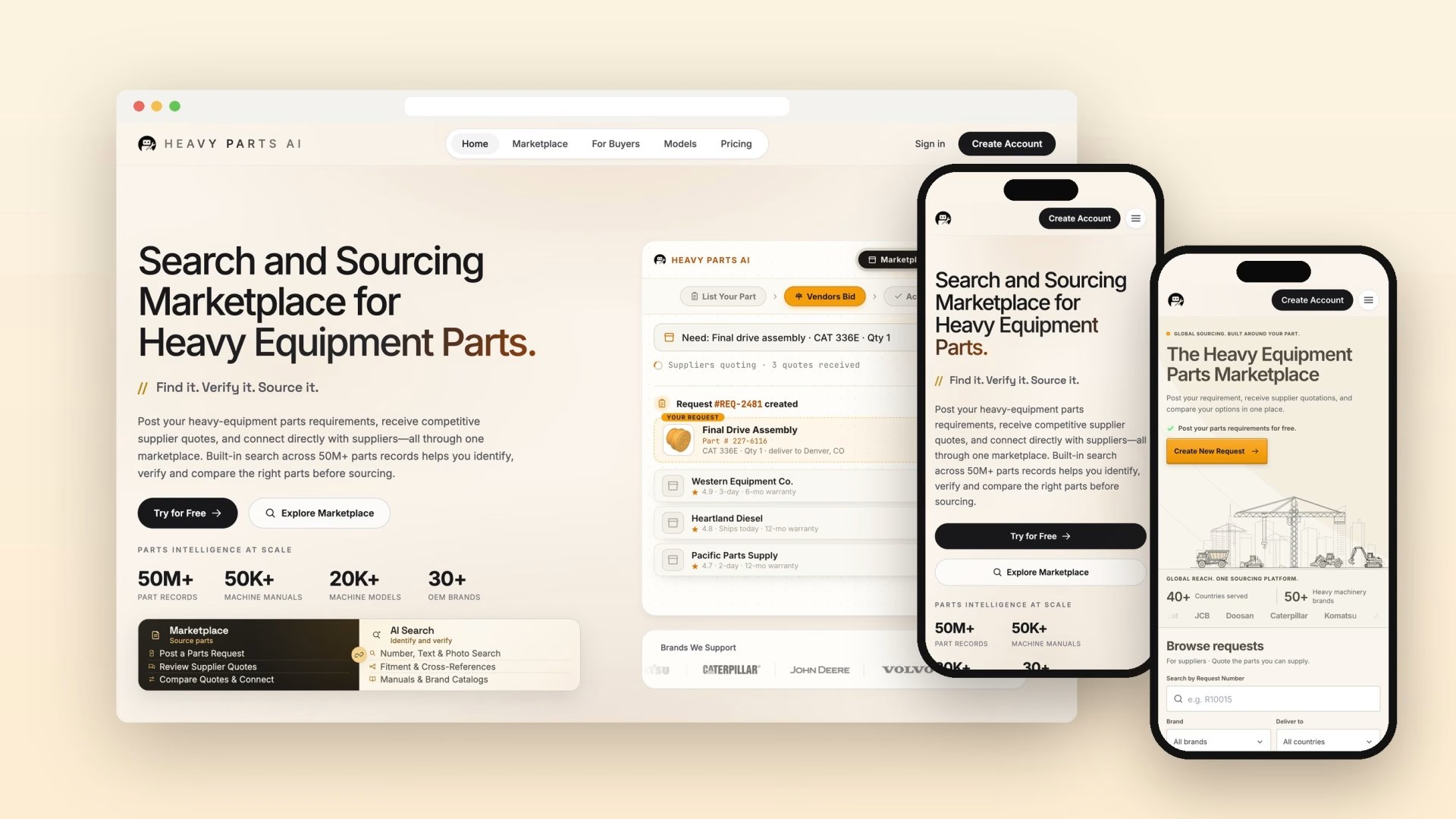
We have delivered AI agents and AI automation for clients, and that work stays private. The project we can show is HeavyParts.ai, which is AI search and not an agent: a buyer asks, the product searches more than 50M part records, and a data pipeline brings records and manuals into that search.
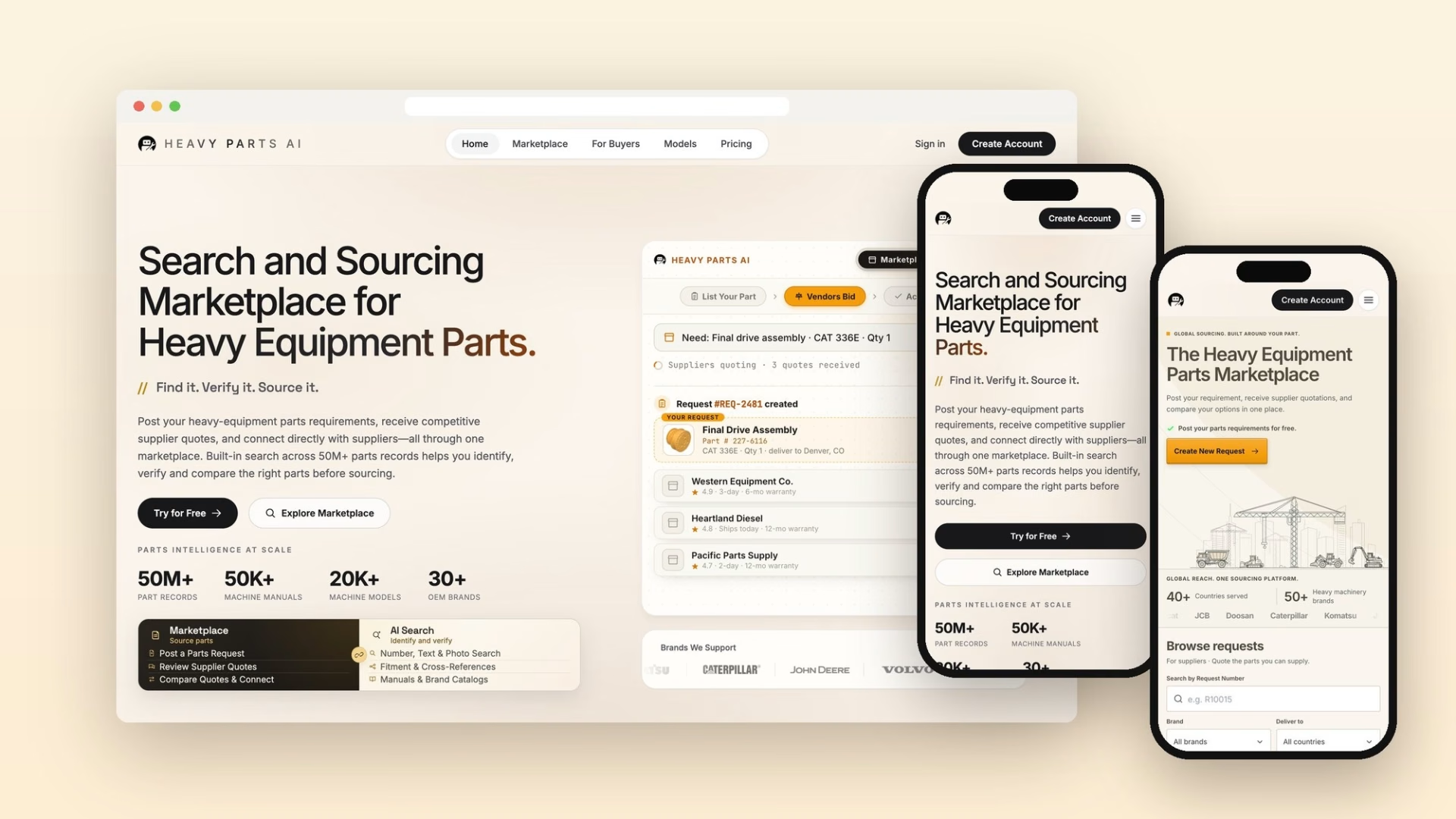
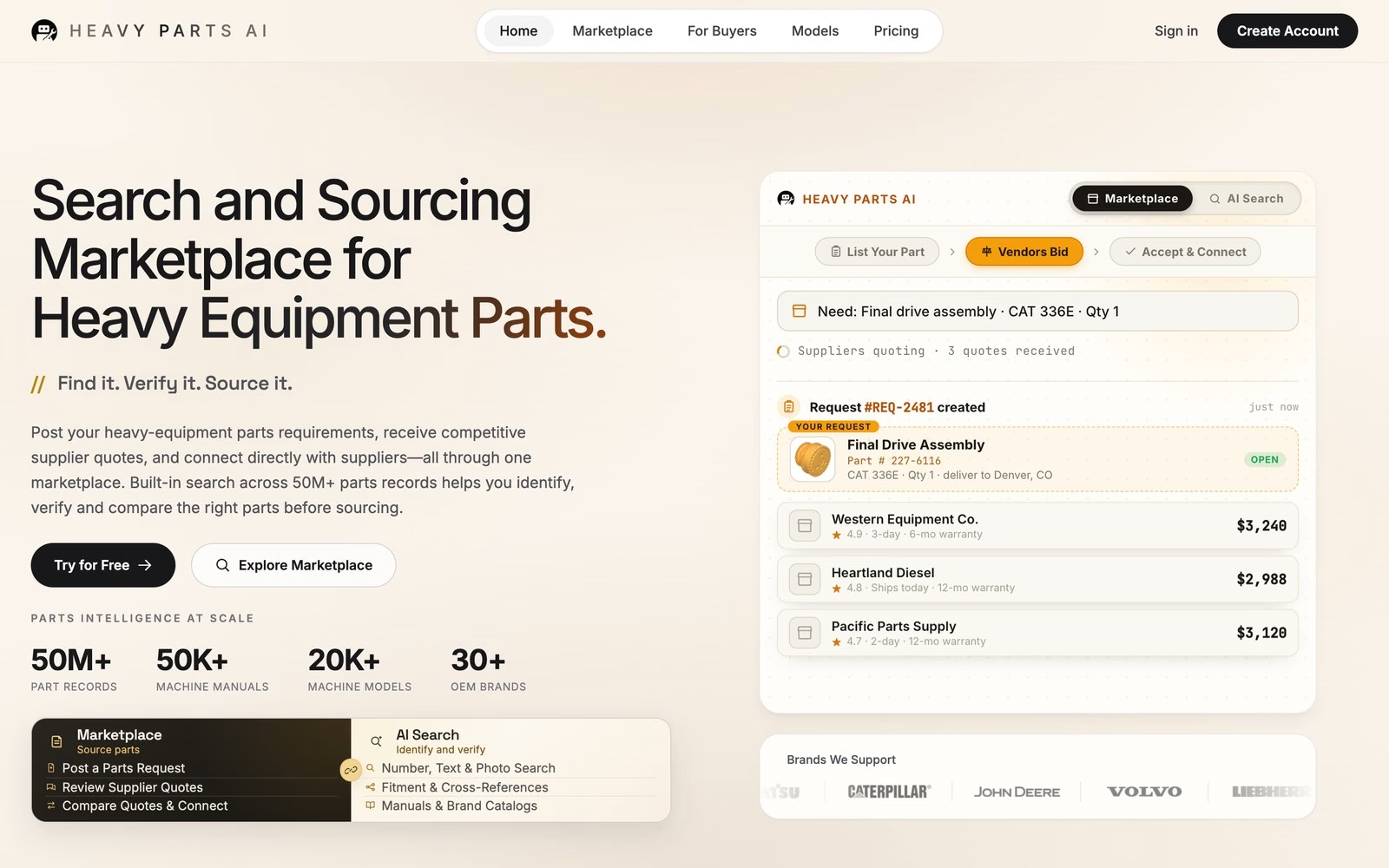
An AI search and sourcing marketplace for heavy equipment parts
Krikir Technologies helped us turn a complex idea into a complete AI-powered platform. Their technical understanding and commitment throughout the development process have been impressive. Great team to work with.
Talk it through on a call
We look at what you have now and what you want it to do.
We tell you how we would do it and who would work on it.
You get a fixed quote in writing after the call, with nothing to sign until you are ready.
How an AI project runs
We send test results in writing between calls, and the booking page shows call times in your own time zone.
Agree one job
One call sets the job and a good result. The fixed quote follows, and it depends on the tools connected, the exceptions and any AI steps.
Set access and limits
We list what the software may read and change, and collect past cases with the people who work them. Data handling is agreed in writing before any real data is used.
Pick the tool and the model
Zapier, Make, n8n or code, chosen on who will maintain it, your data rules and the number of runs. Two or three models are tested on questions your users really ask.
Test each case many times
One pass proves little: in a 2026 study, one computer-use agent finished about 78% of tasks at least once in 10 runs, and only about 36% on all 10. Yours must meet the pass mark you approved.
Run beside the real work
An agent works on live cases in the background and a workflow runs beside the manual process. Nothing goes out until your team approves it.
Go live in stages
A share of users first where your setup allows it. An agent moves up a level when the results support it and you agree, and back down if they slip. Who watches it after launch is agreed in writing first.
How mistakes get caught
Automation tends to fail quietly and models can state wrong answers, so limits are enforced in code, because an instruction in a prompt can be talked around.
Four permission levels
An agent starts at read. Then it may draft, then act with a named person saying yes, then act alone on low-risk work once the results support it and you agree.
The source sits beside the answer
A model can hold the right returns policy and still misquote it, so the reader can open the page it used. When nothing matches, it says so and offers plain search or a contact route.
Retry, log, then tell someone
A failed run is retried and logged, then one named person hears what failed. If an AI step cannot read a field cleanly, the item waits in a queue instead of going through.
Decisions about people stay with people
EU GDPR Article 22 limits solely automated decisions with legal or similar effects, and Australia will require privacy policies to disclose automated decisions from 10 December 2026. A lawyer answers how these apply to you.
Limits sit outside the prompt
The UK's NCSC said in December 2025 that prompt injection, hidden text that tricks a model, "may never be totally mitigated". So keys hold only the rights the task needs.
It says it is AI
Customers are told and can reach a person. EU AI Act Article 50 requires that notice unless it is obvious. A lawyer answers how it applies to you. If it tells a customer something wrong, your business answers for it.
What you keep
Tools, data and model changes
Vendor terms and notice periods can change.

Zapier or Make
Simple workflows between popular apps, which a capable admin can edit. Complex logic gets hard to follow, and high run counts can change the choice.
n8n
Complex logic and many runs, in n8n's cloud or on your own server. Self-hosting needs someone to apply updates, so who patches is named before launch.
Custom code
High volume, unusual systems or steps inside your own app. Changes need a developer, so it suits processes that rarely change.
What is sent
The fields each step needs, plus whatever your tools return. We trim both, because an agent that opens a whole record sends a whole record. Only a local model keeps data inside your systems.
Who keeps it and who sees it
OpenAI keeps API abuse logs up to 30 days. Anthropic deletes API data within 30 days, and flagged content can stay up to 2 years. Google's paid Gemini API keeps it 55 days. None of the three trains on this data by default. Most of our team works from India, so who at Krikir may see what is agreed in writing before any real data is used.
When the model changes
OpenAI's published notice is normally at least six months for generally available models, Anthropic's at least 60 days, and Google sets no fixed period. A new model can choose different steps on the same case, so the test set reruns before any switch.
Other pages for this work
Questions before AI touches live work
Data, testing, errors and the people still involved.

Book a 30-minute call
What we build is set up to run in your accounts without us. Code, prompts, workflow files, the test set and logs are transferred to you on final payment, under the contract, and model and tool accounts are in your name. Someone still has to watch it and rerun the tests when a model changes, and who does that is agreed in writing before launch.
Workflow automation often needs no AI. Copying data and sending reminders work on fixed rules. AI belongs only where something must be read or written, such as pulling fields from a PDF invoice, sorting email or drafting a reply.
Usually not: most AI features join your product through an API and a new part of the interface. A rebuild is worth discussing when your content sits where code cannot read it, or the product is due for replacement anyway.
Your model vendor receives the fields each step needs, plus what your tools return. Paid API terms at OpenAI, Anthropic and Google do not train on that data by default, and they keep it for up to 55 days in normal use, depending on the vendor. Data stays on your servers only if the workflow is self-hosted and the AI step runs on a local model. Who on our team may see what is agreed in writing before any real data is used.
We run it on your past cases or real questions, many times each, against a pass mark you set. An agent then runs in shadow mode on live cases, where your team approves everything before it goes out.
Mistakes will happen, so limits sit in code, risky actions wait for a person and every action is logged. A broken workflow retries and tells a named person, and an AI feature keeps a plain fallback if the provider is down. Tests rerun before any model switch, and who runs them after handover is agreed in writing before launch. If it tells a customer something wrong, your business answers for it.













Let's talk about your next project
Book a 30-minute call or send a brief. A founder replies within one working day.